tree chandelier: my texture and bump map has dropped off and I can't reconnect them
Curio button box on HUD screen needs to be connected to Curio box scene
Start menu needs play movie? button
IF
I can film a "fly-over" of the game. It may be worth doing that so people don't get caught up and frustrated by the maze.
Speaking of which, adjust the jasmine and lavender mazes so there's more walking room between the hedge rows.
Ask Rachel why animation for front door isn't going in. I've stripped the whole front door out because there were a lot of weird redundancies in the game.
Showing posts with label BSA228. Show all posts
Showing posts with label BSA228. Show all posts
Wednesday, November 9, 2016

Monday, November 7, 2016
BSA228, finishing up the game, 7 November, 2016


Thursday, November 3, 2016
BSA228, house inspiration, 3 November, 2016

Monday, October 31, 2016
BSA228, Mood lighting, 1 November, 2016

 |
| Lulu and the talking topiary |
 |
| quite by accident, there appears to be a second facial toiary in the garden. |
 |
| Lulu considers which maze she's going to explore first |
 |
| Lulu in the lavender maze |


 |
| At the front door with the door knockers that she found in the mazes. |
 |
| pre-set skybox. rotating the directional light around changes the position of the sun in the sky |
 |
| Super moody! a little backlight at the back is great to throw the castle into relief. |
 |
| Lady Greigh's talking topiary is looking ominous |
 |
| Greigh Gardens with the addition of a free downloadable skybox from the Unity store that Rachel showed me how to manipulate. A layer of blue over a cloudy sky darkened it up enough to pass for sunset. Then I added a harvest moon into the right background plate |
BSA228, splash screens, 31 October and 1 November, 2016
minimum requirements,
splash screen with start game and quit buttons
splash screen should be separate from level one
in Unity, open new scene and save as start
drag and drop it so they're in exact order as game should be played in build settings
3 layers on every seen
U- user
UI-user interface
game
Game Object to UI to canvas, which is like a photoshop file
UI components can be added directly into canvas through add component bar- anything in a website is available.
problems with going straight into canvas: ex: typing into text box means it won't move separately from the canvas, we can only rely on paragraph alignment tools.
instead,
game object- UI- text which makes the text it's own object and it can move independently from the canvas. if the text gets bigger than it's box, it will disappear. change box size in rect transform, which is where you can also move the text around in the game.
if you don't want ARial as the font, you need to put the font in the build. go into photoshop and figure out what font you've used
create folder in assets for fonts
embed them in the game by saving them into the font folder
in C drive, under windows, go into fonts folder if you want to use fonts from your computer.
Can also download fonts from fonts.com
hit overflow if you don't care about box size.
buttons do care about overflow, so size up box instead of selecting overflow options
game object- button
automatically says button but that can be changed
button and text can be moved separately
remove white button after sorting out the layout by hitting alpha? bar under color in inspector
keep space between the buttons so game doesn't get confused
Bring in background picture by
create folder in assets called UI elements to bring in picture (without fonts)
save as PNG
in inspector, can choose sprite 2D and UI for more options
change image size from 100 by 100 to whatever the size was in Photoshop
Ipads are:
My game font is Century Gothic Bold in 72

1st November
Ipad aspect ratio isn't important at this stage, so I went back into photoshop and resized it to fit the canvas in Unity. Rachel showed me
splash screen with start game and quit buttons
splash screen should be separate from level one
in Unity, open new scene and save as start
drag and drop it so they're in exact order as game should be played in build settings
3 layers on every seen
U- user
UI-user interface
game
Game Object to UI to canvas, which is like a photoshop file
UI components can be added directly into canvas through add component bar- anything in a website is available.
problems with going straight into canvas: ex: typing into text box means it won't move separately from the canvas, we can only rely on paragraph alignment tools.
instead,
game object- UI- text which makes the text it's own object and it can move independently from the canvas. if the text gets bigger than it's box, it will disappear. change box size in rect transform, which is where you can also move the text around in the game.
if you don't want ARial as the font, you need to put the font in the build. go into photoshop and figure out what font you've used
create folder in assets for fonts
embed them in the game by saving them into the font folder
in C drive, under windows, go into fonts folder if you want to use fonts from your computer.
Can also download fonts from fonts.com
hit overflow if you don't care about box size.
buttons do care about overflow, so size up box instead of selecting overflow options
game object- button
automatically says button but that can be changed
button and text can be moved separately
remove white button after sorting out the layout by hitting alpha? bar under color in inspector
keep space between the buttons so game doesn't get confused
Bring in background picture by
create folder in assets called UI elements to bring in picture (without fonts)
save as PNG
in inspector, can choose sprite 2D and UI for more options
change image size from 100 by 100 to whatever the size was in Photoshop
Ipads are:
4:3

1st November
Ipad aspect ratio isn't important at this stage, so I went back into photoshop and resized it to fit the canvas in Unity. Rachel showed me
BSA215, comic turn in, 31 October, 2016
Covered in Shame. Half of my comic doesn't have bubbles or words. I underestimated how long it would take to bubble and letter a double-size comic. When I go back to it, though, Rachel has kindly shown us how to make shape bubbles in photoshop with the shapes menu. It will go in white and then I can click to the sideo f the layer to bring up the effects menu and choose a 4 pixel black stroke to go around it. huzzah.
half moon addlayer and curbes layer at top of hierarchy
put it all into one photoshop file
drag out rulers to take two mil off edges
save each page as a jpg, save as page numbers (cover is page one, back cover is page 20)
open adobe acrobat, file, create, combine files into single pdf
drag and drop into box and reorder if necessary, then hit combine files to save as one big pdf.
title combined pdf with my name
to avoid pixellation in pdf, make everything a tiff and take them into indesign and take them out to PDF from there.
Tuesday, October 25, 2016
BSA228, World Decoration, 25 October, 2016


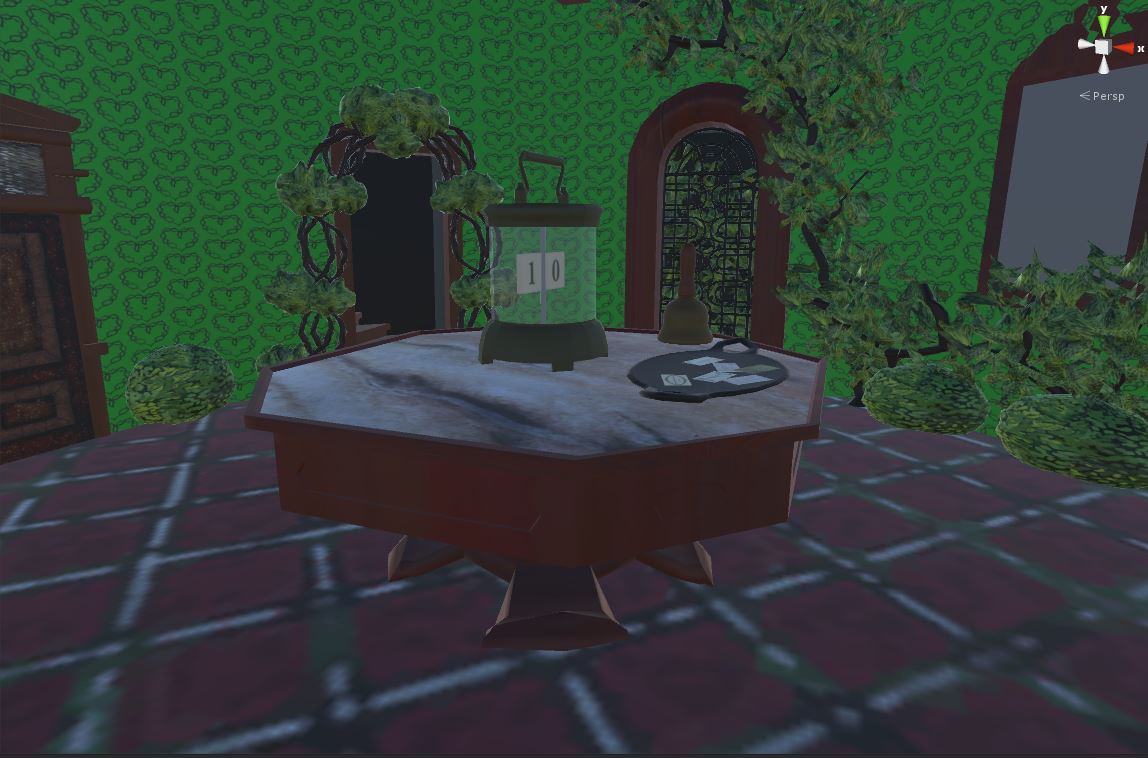


There's no good view of it yet, but I made a ceiling and covered it with purple floral vines.
This image from pinterest

BSA228, Curio cabinet, 25 October, 2016

This is an inspiring curio cabinet. Maybe I can set mine up halfway with what the player has seen and they have to fill in the rest?
Monday, October 24, 2016
BSA228, final assets, 24 October, 2016

 |
| Lady Greigh's talking topiary |

Lady Greigh's glasses, one of the collectibles of Level One
 |
| not too fancy. But maybe if I take it into mudbox... |
 |
| calling cards to alphabetize |
 |
| curio cabinet |
 |
| door knocker 1 (collectible) |
 |
| door knocker 2 (collectible) |
Thursday, October 20, 2016
BSA228, "Making Things Look Good in Unity", 20 October, 2016
This is an actual channel on youtube, and a very timely discovery by Joe Ramage.
It's a series of videos in which the host dabbles and uses case studies to improve the visuals of video games made in Unity.
I need fireflies around the tree chandelier, animated doors, and general gloom over the world which could be fog, flickery scratches on the "lens" of the camera, and sound.
Particle 102
uses unity 5.2
particles can be adjusted at birth or over time
check pre-warm so nobody sees the loop start
additive blending gets particles made of RGB colours to turn white when they overlap
Animation 101 see animation instructions at 2:55 mark
hit record to get started
free fireflies particle kit from unity store
free lazy fog system
something I didn't realize I needed: music
music with loops for seamless play- look in free music file at school
ambient horror sounds
more horror sounds
tinkly horror sounds
Tuesday, October 18, 2016
BSA228, Assets and what not To be made, 18 October, 2016
Garden
in Maya
Lady Greigh topiary (try using a prefab face and then texturing it in Mudbox. also, blend shapes so it will speak)
extra topiary trees/bushes
2D "card cutout" of Todd?
in Unity
overgrown grass
Mazes
in Maya
door handle 1
door handle 2
in Unity
overgrown grass
Corridor
in Maya
animate door knocker hands with blend shapes (grasping motion)
in Unity
overgrown grass
Foyer
in Maya
Lady Greigh's glasses
clock (and animate a 10 second countdown, too!)
calling cards
Butler's bell
silver tray
in Unity
vines
animate doors
Curio Box
in Maya
Lulu
fix up her animation cycles and get them into the game
put a smooth node on all action cycles
start coding
???
The list is getting shorter!!!
BSA228, setting the scene, 17-18 October, 2016
I've been worked on assets all weekend and made more Monday night. I've been decorating the game world for two days now. Nothing has gone in with LODs, in spite of a half-hearted at making them, because I question their necessity. When you leave the room, you wouldn't see anything, anyway, so why should there be any level of detail? Rachel says not everything needs it anyway, and LOD can also be loaded in within Unity.
 View from the garden, looking up at the house. This is a view only I as the programmer will see. The player will see from the just behind Lulu and probably wouldn't go this low?

Shiny windows were added by selecting the window faces and changing the material to a highly reflective blinn and monkeying with the transparency settings. Making them black and setting up a black plane inside the window makes it look both transparent and like a dark room is inside.

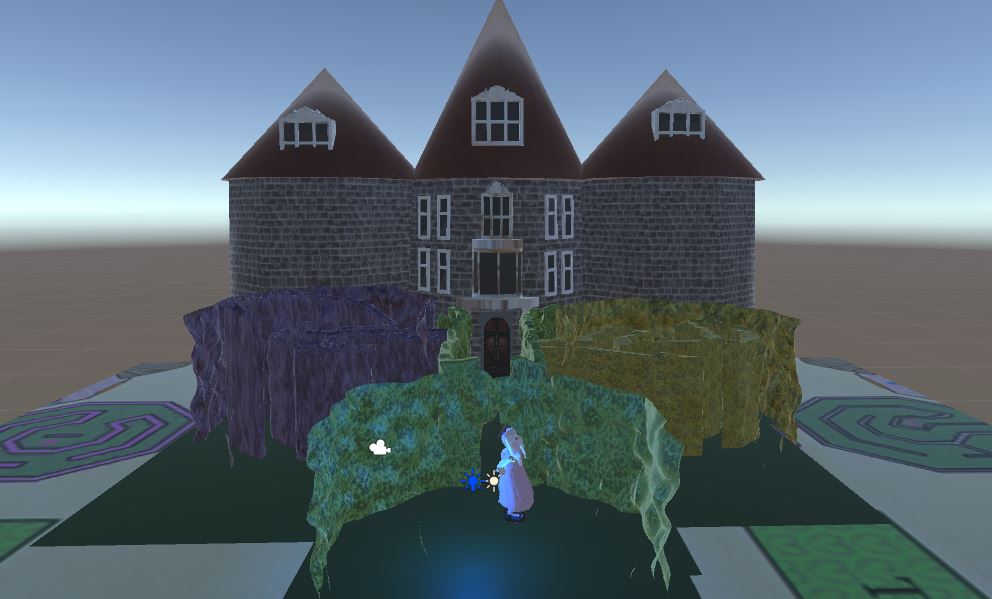 |
| Decorating the house. Very exciting! Sooooo many props to load in and place, and there are still more to make. |

 |
| Rachel put the blue glow in- I think it was for moody moonlight, but it looks quite good coming from the ornamental pond. |
 |
| Aerial view of the world. The roof doesn't fit the building, and doesn't need to because we won't see it in the game. The house needed to be expanded at the back to accomodate the weird alcoves that come off the doors. I added prefab trees in Unity . They'll never be seen but will fill in the skyline above the maze and will make the place look wilder. |
 |
| Aerial view lavender maze |
 |
| Aerial view jasmine maze |
 |
| View from the corridor towards the front door |
 |
| The dressed front of the house. |
 |
| The skybox is currently set on day. It will be a moonlit scene once the set dressing is finsihed. |
 |
| Overhead shot of the 2/3 empty shell of the house and the foyer. Do I need to put a ceiling on the inside of the foyer? Probably. |
 |
| The table is empty. It will have a silver tray with calling cards to alphabetize, a clock to set the play time, and a bell to ring the Butler on completion. I'd like to hide the Gilmour House girls' drawings in here somewhere, but where? |
 |
| From the center vantage point: The parlour door and the staircases. |
 |
| View towards the kitchen door and the portraits on the wall. Lady Greigh's glasses will be "hidden" in the coat on the coat rack |
 |
| View towards the inside of the front door. The mirror needs a reflection shader, which Reuben suggested could be somewhere in Unity already. I'd buy one if it was cheap enough. |
 |
| The door to the Conservatory and shrubbery. |
Monday, October 17, 2016
BSA228, final assignments, 17 October, 2016
Assessment 3: Game Build
For this assignment, you should have an art-based prototype ready for players to interact with your character and world. There must be an introduction page to your game giving your players options to play, escape or learn. Your environment build should be optimised for game play, with physics already applied to allow interaction by the player. The scene should be lit and all post processing applied. The characters should be optimised and ready for game play. Their animation trees should work seamlessly with player input and they should react with their environment. All menus, maps and Head Up Displays should optimised for the game engine and be within the game and ready for scripting.
Characters:
- Motion trees must be set up and work with the scripting to allow seamless player input
- Character design must match the look and feel of the game and your research with texturing and lighting complementing the design
- Characters must appeal to your intended target audience
- Animation must be smooth with all pops ironed out.
- Animation must be weighted correctly
Environment/props:
- All items should have the correct physics applied to allow the characters and objects to interact.
- All artwork must be of a high professional standard
- All items should be complete and textured
- Artist development must reflect your intended style
- All items must be technically professionally finished and optimised for unity
- Cameras must be set appropriately to enhance gameplay and have all post production filters applied
- All areas should be lit to reflect stylistic intent and gameplay
Menus, HUD’s and maps:
- All user interfaces should be logical and player friendly
- Entrance Menus should all be coded and in full working order
- HUD’s should be designed to minimalize player distraction and maximise game play
- All imagery should be optimised for the game engine
- If a map is needed it should be easy to access and optimised for player use
Assessment 4: Game Design Document
Your proposal should be updated to reflect the final project, this should include the documentation of your art portfolio and the new directions in which your final production has taken. Do not delete the original explanation, where things have changed reflect this by adding amendments.
Title:
- Game title
- Intended game Systems
- Target demographics
- Game logs
- Logos etc
Story:
- A games story summary
- Beginning, middle and end
- Motivations and conflicts
- Feel and mood of the game
- Game flow
- What type of game and the main locations and player goals?
- Progression and reward system
- How does came play tie into story
- What is the victory condition?
Characters:
- Incorporates a hero with a defined Character arc
- All characters must have clear motivation
- Backstory which defines the character type
- Signature moves, abilities weapons etc.
- Enemies and or bosses and who are they and how are they being used.
- Final artwork and bios
Game World:
- When and where is your world set
- Describe what the world should look and feel like.
- How the player should interact with the world?
- How do your locations tie into your storyline?
- Level map should be provided with the concept art.
- Final artwork and screen shots
Gameplay:
- Detail how sequences of play are presented
- Are there levels, rounds chapters, mini games, puzzles
- How do the characters play out in these scenarios?
- Include supporting screen shots and artwork.
Mechanics and Hazards:
- Examples of mechanics which aids the player
- Moving platforms, opening doors, ladders etc.
- Examples of Hazards which can hinder or kill the player
- Spike pits, flaming jets etc.
- How are these things used in your environment?
- Power up and what they can give the player
- Collectibles and their impact on the game
- Economy system, which is how are the players gaining and spending
Controller:
- How does the player control elements?
- Mapping of elements to main game play i.e. controller, keyboard, gestures
- Where or how is the camera controlled?
Game Experience:
- The look and feel of the whole project as a consumer product
- How is it presented to the consumer? I.e. packaging and cinematics
- How does the player get lead into the storyworld, ie Menus, HUD’s, cut scenes?
- Final Artwork and in game screen shots
Saturday, October 15, 2016


Subscribe to:
Posts (Atom)